FAQ Page

1.What courses are available?
Courses feature concise micro‑video modules that provide in‑depth guidance on break‑fix procedures, troubleshooting, service best practices, and common issues.
- Customers, Resellers or Externals: Our training portal is available as a paid service. Explore the information provided to learn more about our offerings. Click here to download the Supermicro Customer Course Catalog.
- Employees in Supermicro: Access is free and uses Supermicro SSO; however, you must first request an account by emailing supermicro_education@supermicro.com. Once your account is created, you can download the Supermicro Internal Course Catalog.
_____________________________________
2.Who can I contact for assistance?
For any questions or support related to training enrollment, please contact the Training Support Team at supermicro_education@supermicro.com.
_____________________________________
3. How do I request enrollment?
Enrollment is by request only. To initiate the process, please submit an enrollment request through the official portal link provided in your communication or contact our training support team directly.
________________________________________
4. What information is required for enrollment?
To complete your enrollment, please provide the following details:
- Last Name
- First Name
- Company Name
- Department
Incomplete submissions may delay processing.
________________________________________
5. Is there an enrollment fee?
Yes, there is a fee for external users. Enrollment in the training portal is a paid offering. Pricing details will be communicated upon request or included in your confirmation email.
________________________________________
6. How will I receive confirmation?
Once your request has been reviewed and payment processed, you will receive a confirmation email containing your login credentials and access instructions.
________________________________________
7. Can multiple participants from the same organization enroll?
Yes. Multiple participants from the same organization may enroll.
________________________________________
8. How do I access the training platform?
Log in using your credentials from online_training@supermicro.com.
________________________________________
9. What happens after I complete a certification?
You will receive:
- A digital certificate (PDF) with the unique certified number.
________________________________________
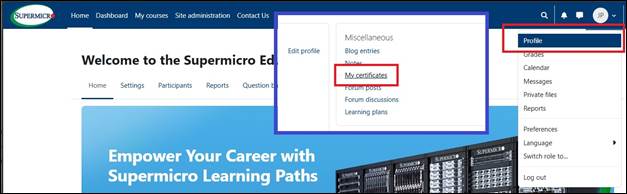
10. How do I view all the certifications I've earned so far?
To view all your certifications:
- 1. Log into the Supermicro Education Portal.
- 2. Navigate to the Profile drop-down menu.
- 3. Click Profile.
- 4. Select My certificates.
________________________________________
11. How do I reset my password?
Click “Forgot Password” on the login page and follow the instructions sent to your email.
________________________________________
12. I tried to log into the Education Portal with my Supermicro credentials but received the following error message: "The login attempt failed. Reason: An account with your email address could not be found." What should I do?
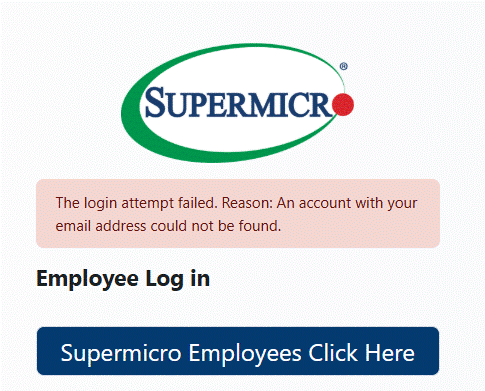
Contact our Training Support Team at supermicro_education@supermicro.com to request account creation.
________________________________________